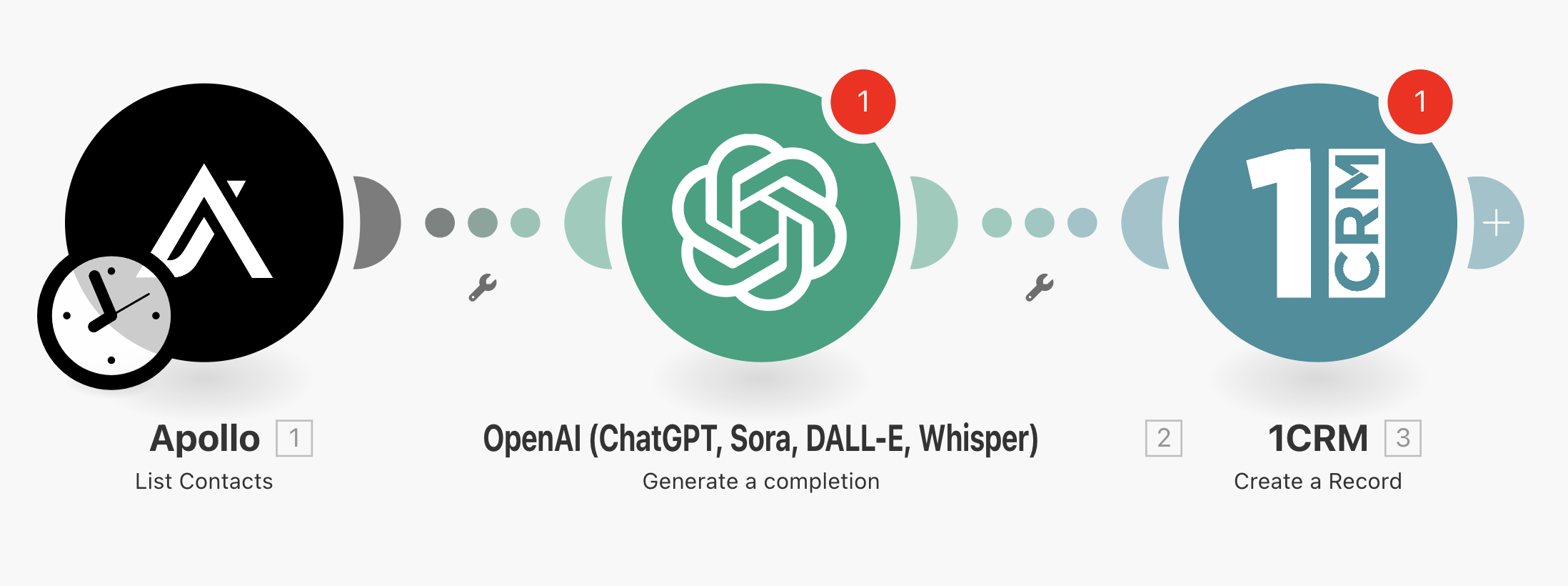
How to Deploy Your AiGanak Prospecting Engine
Follow these 5 steps to activate your AI automation:
1. Prepare the File
- Download and Unzip the
AiGanak-Prospecting-Engine-v1.zip to your desktop. You will need the .json file inside.
2. Import to Make.com
- Log in to your Make.com account.
- Click "Create a new scenario" (top right).
- Click the Three Dots (...) in the bottom menu and select "Import Blueprint".
- Select the
AiGanak-Prospecting-Engine-v1.json file.
3. Connect Apollo.io (The Lead Source)
- Click the Apollo module (it will be flashing or have a red exclamation mark).
- Click "Add" to create a connection.
- Paste your Apollo API Key (found in Apollo Settings > API).
- Select your "Saved View" or "Search List" that you want to automate.
4. Connect OpenAI (The AI Copywriter)
- Click the OpenAI module.
- Click "Add" and paste your OpenAI API Secret Key.
- Crucial: Ensure you have at least $5 of credit in your OpenAI playground account for the API to run.
5. Connect Your CRM
- Click the final module (HubSpot, Salesforce, or Google Sheets).
- Click "Add" to authorize your account.
- Map the "AI personalized hook" variable from the OpenAI module into your CRM's "Note" or "Intro" field.
6. Test & Activate
- Click "Run Once" in the bottom left corner.
- If the bubbles turn green, click the Scheduling Switch to "ON" to let the engine run in the background!